
Holiday and Business Day Calculator: Tutorial
The Federal Court system observes holidays that the State Court system does not, and the court calendar differs from the civil calendar. The website’s holiday calculator lists both and counts business days in three different ways.
What the holiday calculator solves
Counting business days seems straightforward until the question arises of which calendar to use. The civil calendar, banking calendar, and court calendar do not align, and the difference determines deadlines.
The Federal Court system observes its own holidays, established by specific legislation, including days during Holy Week and other dates that do not appear on the regular calendar. A deadline calculated under the civil calendar during those periods expires earlier than it should.
There are also optional holidays, which are not legal holidays. They suspend regular operations at many public bodies, but their treatment varies, and automatically treating them as holidays produces an incorrect calculation.
The website tool displays the annual calendar with each date classified and offers a business-day counter with three calculation modes.
When the tool helps in a specific situation
Its most common use is projecting a date from a given number of business days, an operation often needed for contractual and administrative deadlines.
Other recurring situations include:
- checking the year’s national and state holiday calendar;
- identifying which dates are holidays and which are optional holidays;
- counting court business days for procedural deadlines;
- planning deliveries and schedules based on actual business days;
- checking the total number of business days in a year for work-hour calculations.
The distinction among the counting modes is what sets the tool apart from a generic counter. The court mode accounts for the year-end suspension of deadlines and holidays specific to the Federal Court system.
An optional holiday is not a legal holiday. Treating it as one shortens the calculation and moves up a due date that does not exist.
The tool’s table identifies each date by its exact nature, allowing you to decide each situation individually.
Step-by-step guide to the tool’s screens
The calculator is in the website’s tools section, among the utilities, and works in your browser.
1. Open the tool and choose the year and state
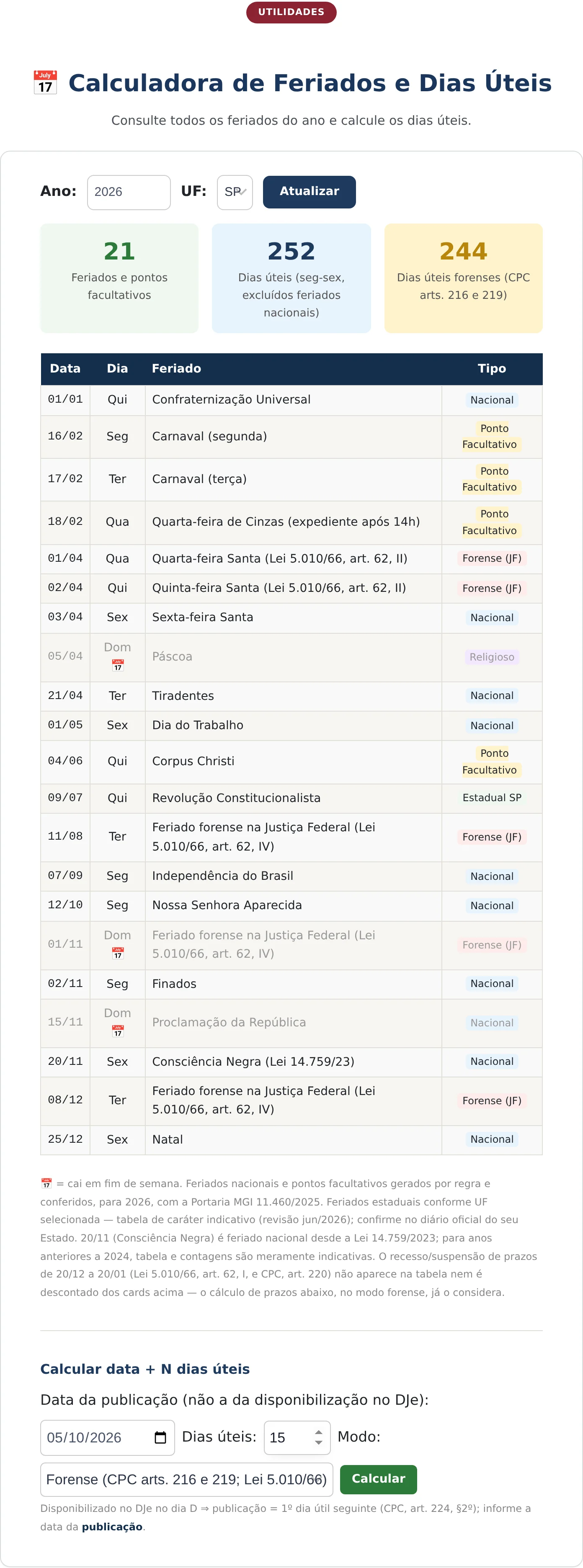
The screen has two sections. The first sets the calendar: year and state, with an update button. The second is the business-day counter.
Once the calendar is updated, three indicators appear at the top: the number of holidays and optional holidays, the total number of business days under the standard criteria, and the total number of court business days. Below them is a table showing the date, day of the week, name, and type of each occurrence.

2. Complete the business-day counter
The second section takes a start date, a number of days, and a counting mode. In the example, the date entered is in October 2026, and the deadline is 15 days.
The mode selector is the most important field. It lets you count under the standard criteria, Monday through Friday excluding national holidays, or under the court criteria, which incorporates holidays specific to the Federal Court system and the year-end suspension of deadlines.
3. Calculate and read the result
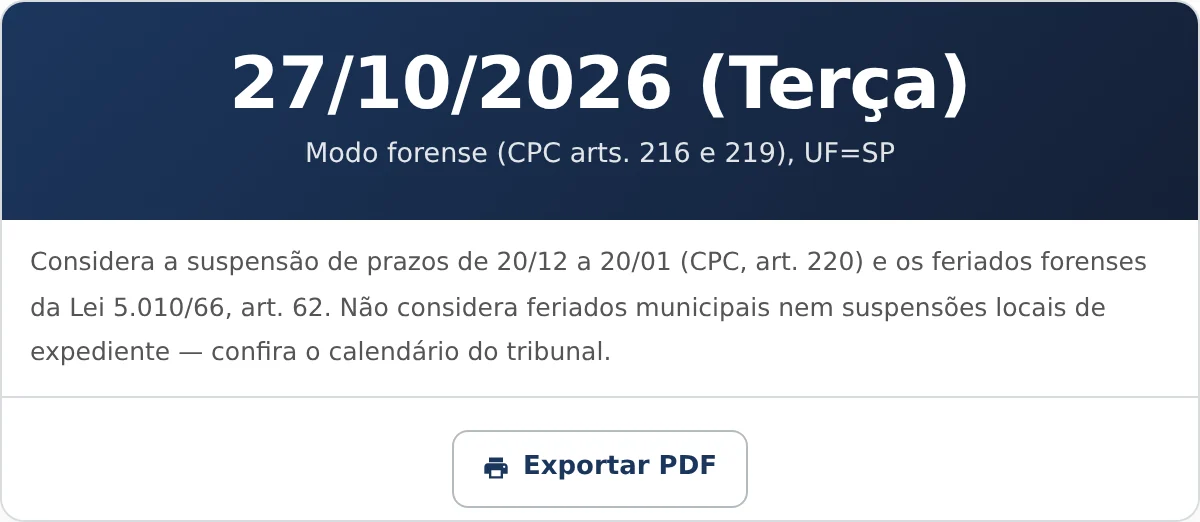
The calculation button returns the final date, including the day of the week, the mode used, the state considered, and the applicable qualifications.
How to read the calendar and the result
The annual table classifies each date into one of four categories. National holidays are established by federal law and apply throughout the country. Optional holidays are dates on which regular operations are waived, without the force of a legal holiday.
Federal Court holidays appear with their own designation and correspond to dates established under legislation specific to that branch, including Holy Week days that are not civil holidays.
There are also religious dates that do not affect deadlines, displayed as calendar references.
In the counter result, the most important line identifies the mode and the state. It allows you to reproduce the calculation and explains why the same starting date may produce different due dates depending on the court system.
The footer states the two standard qualifications: the suspension of deadlines from December 20 through January 20 is included, while municipal holidays and local suspensions of regular operations are not. The second qualification applies to any counting tool, and checking the court’s calendar remains essential.
Why the court calendar is different
The existence of a separate calendar for the Federal Court system often surprises those who work primarily in the State Court system.
The law governing the Federal Court system establishes specific holidays, on dates not listed on the national civil calendar. There are no regular operations on those days, and deadlines do not run in that branch, although they run normally in the State Court system.
Added to this is the year-end suspension of deadlines provided for in the Code of Civil Procedure, which applies across all branches and pushes into January deadlines that would otherwise run through that period.
There are also state holidays, which vary by state and affect the courts located there. That is why the tool includes a state selector.
The combined effect of these three factors explains why manually calculating procedural deadlines is risky, and why the court’s official calendar remains final, since local administrative orders may suspend regular operations without prior notice.
One use of the tool falls outside the procedural context and is quite practical: planning contractual and administrative deadlines.
Many contracts set obligations in business days without specifying which calendar they adopt. In the event of disagreement, the usual reference is the civil calendar, with national and state holidays, rather than the court calendar. The tool’s standard mode addresses precisely that situation.
In the administrative context, counting also generally follows business days, and the applicable calendar is that of the agency, which may have its own state or municipal holidays. The indicator showing the year’s total number of business days, displayed at the top of the screen, helps with planning annual schedules.
In either case, the recommendation remains the same: when a deadline has significant consequences, the calculation should be confirmed against the applicable official calendar, because no generic tool knows about local suspensions.
What the calculator does not do
The tool does not account for municipal holidays or local suspensions of regular operations, a limitation stated in the result itself.
It also does not consult the court system and cannot identify administrative orders suspending deadlines because of specific events, such as unavailability of the electronic system.
And it does not replace the procedural-deadline calculator, which also addresses the right to double deadlines and the rule governing the initial date.
Frequently Asked Questions
Does an optional holiday suspend a deadline?
It is not a legal holiday and does not automatically have that effect. Its treatment depends on the body involved and on any administrative order waiving regular operations. The tool’s table identifies each date by its exact nature, so the decision can be made case by case.
What is the difference between standard and court business days?
Standard business days count Monday through Friday and exclude national holidays. Court business days incorporate holidays specific to the Federal Court system and the year-end suspension of deadlines, reducing the total and shifting due dates.
Does the tool account for municipal holidays?
No. It warns you of this in the result. In judicial districts with frequent local holidays, checking the court’s official calendar is essential before relying on the displayed date.
Receba novidades por e-mail
Cadastre-se gratuitamente para receber nossos novos artigos.
Seus dados estão protegidos conforme a LGPD.
Ficou com dúvidas? Fale com um advogado especialista.
📱 Falar pelo WhatsAppAs informações deste artigo são de caráter informativo e não substituem consulta jurídica individualizada. Cada caso possui particularidades que exigem análise específica.


