
Notice Period Calculator: A Step-by-Step Guide
Calculating proportional notice combines a fixed 30 days with an additional 3 days for each full year of service, and that is where mistakes often arise. The website calculator performs this calculation and also returns the termination date that must be recorded in the employment record book.
What the notice period calculator does
The notice period ceased to be a single 30-day period when Law 12.506/2011 established proportionality. Since then, each full year of service adds 3 days to the basic period, up to a maximum additional 60 days. In practice, notice ranges from 30 to 90 days, and employees with longer service receive more notice.
The calculation may seem simple, but it involves three sources of error that frequently arise in terminations. The first is counting full years, which is not the same as counting years that have begun. The second is how the period is counted in days, excluding the day notice is given and including the due date. The third is the termination date recorded in the employment record book, which, in the case of notice paid in lieu, is not the actual date of termination.
The website’s notice period tool resolves all three issues at once. It receives the hire date, the date notice was given, who initiated it, and the form of notice, then returns the number of days, the last day of the period, the termination date for the employment record book and, when salary information is provided, the estimated amount of notice paid in lieu.
When the tool helps in a specific case
Its most common use is checking a termination settlement that has been received. An employee dismissed without cause can compare the days applied by the company with the days guaranteed by law and find out, within seconds, whether any notice period is missing. A difference of just a few days changes the amount of notice paid in lieu and, consequently, the proportional 13th salary, proportional vacation pay, and the FGTS (Brazil’s Length-of-Service Guarantee Fund) deposit for the projected period.
Other situations in which the calculator is commonly used:
- planning the termination date by the employer, which needs to know how long the contract is projected to continue;
- resignation, when the employee wants to know how much notice must be worked and what may be deducted;
- constructive dismissal, which follows the same rule as dismissal without cause;
- checking the termination date in the employment record book before validating documents;
- calculating the deadline for applying for unemployment insurance, which depends on the projected date.
In any of these situations, the benefit is not merely arithmetic. It is being able to see, on the same screen, the legal basis for each line, allowing you to discuss the figure with the company or accountant without relying on memory.
Three days for each full year of service may seem like little, until seven years with the company turn 30 days of notice into 51.
The example used in this tutorial shows exactly that effect, using fictional data selected to make the difference clear.
Step by step through the tool’s screens
The calculator is located in the website’s tools area, in the employment-law tools section. It operates entirely in the browser, with no registration or data submission required.
1. Open the tool and identify the fields
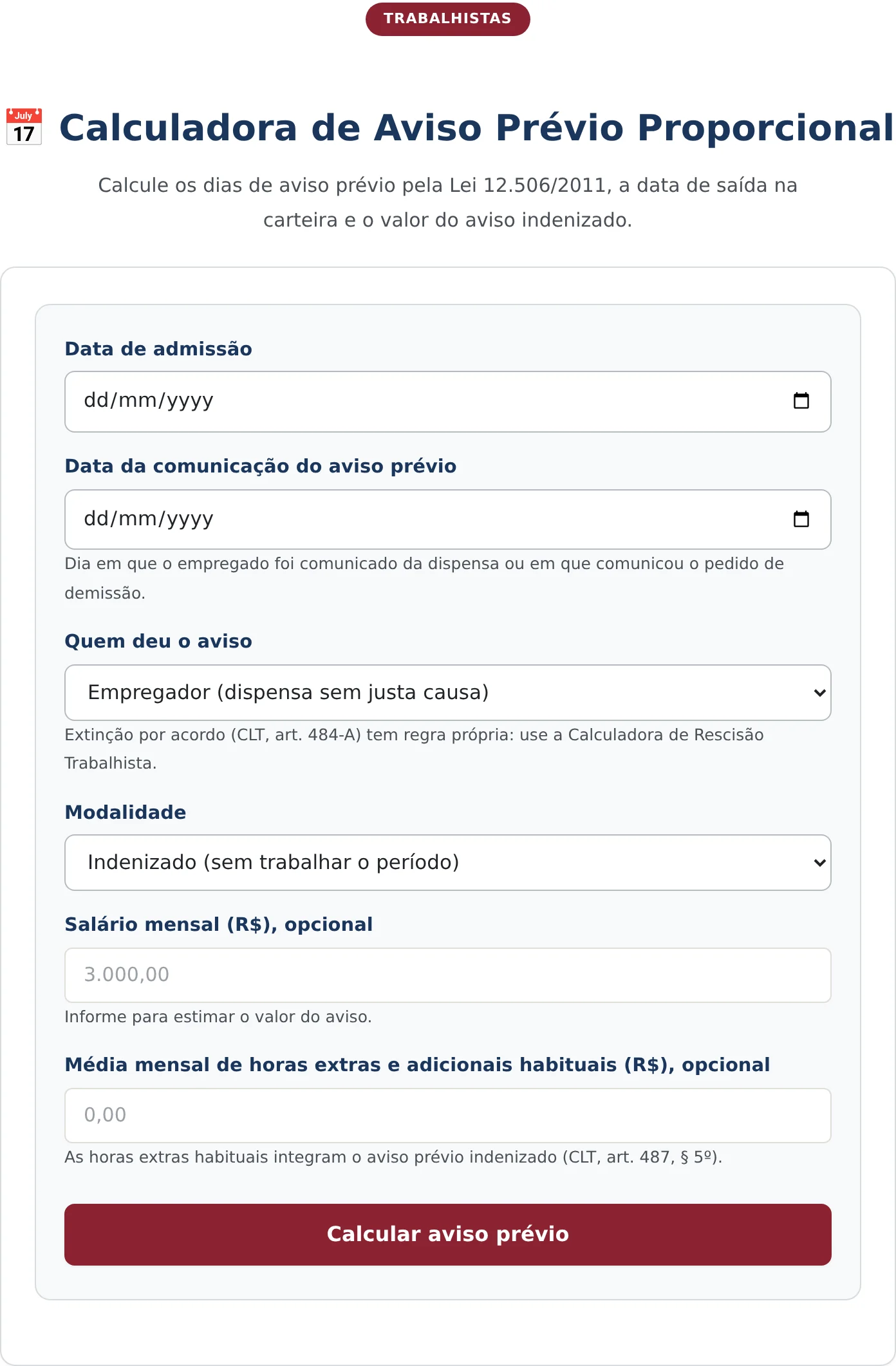
When you open it, the screen displays six fields, two of which are optional. The required fields are the hire date, the date notice was given, who gave notice, and the form of notice. Directly below several fields, there is brief guidance indicating the applicable article and avoiding the most common question about that specific field.
The field “Who gave notice” deserves careful reading because it separates three distinct legal situations: dismissal without cause by the employer, constructive dismissal due to serious misconduct by the company, and resignation by the employee. Termination by mutual agreement, under art. 484-A of the CLT (Brazilian Consolidation of Labor Laws), has its own rule and is addressed in another tool, as the field itself indicates.
2. Enter the contract information
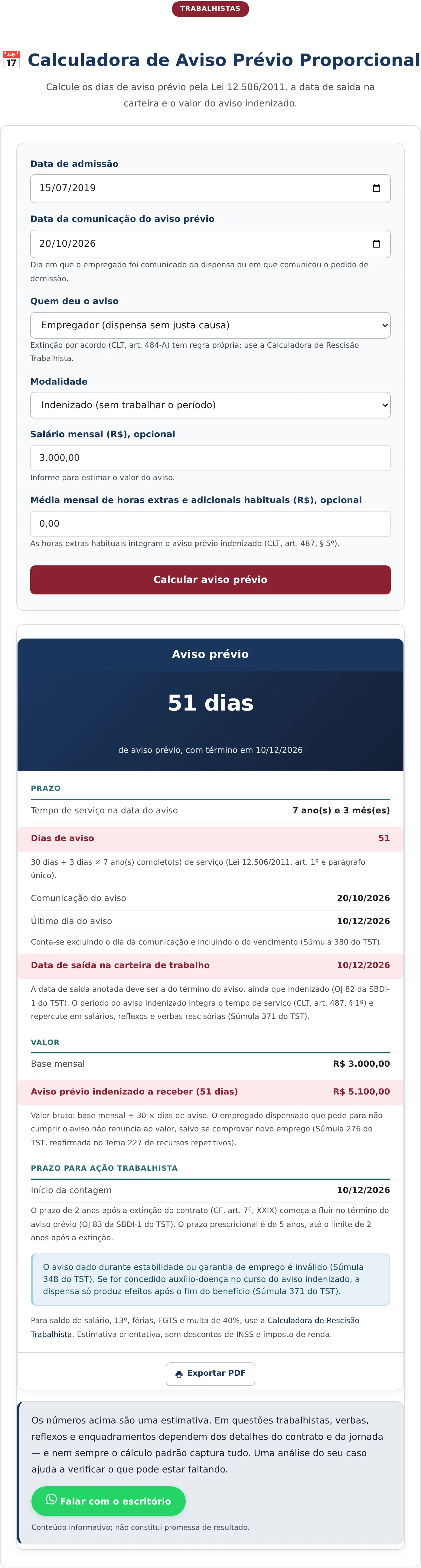
Complete the fields in the order shown on the screen. In the example, the hire date is July 15, 2019, and notice is given on October 20, 2026. Notice was given by the employer, in the form of notice paid in lieu, and the reported monthly salary is R$ 3.000,00.
The two optional fields deserve the attention of anyone with variable compensation. Monthly salary is used to estimate the amount of notice paid in lieu. The field for average overtime and regular additional pay exists because these amounts are included in notice paid in lieu under art. 487, § 5º, da CLT. Anyone who regularly worked overtime and leaves this field at zero receives an estimate lower than the amount due.

3. Calculate and read the result
Once the fields are completed, the “Calculate notice period” button opens the results card directly below the form. The result provides more than just a number: it breaks down the calculation and identifies the rule supporting each step.
How to read each line of the result
In the example, the result indicates 51 days of notice, ending on December 10, 2026. The breakdown follows: 7 full years of service as of the notice date generate an additional 21 days, which, added to the basic 30 days, reach the 51 days established by Law 12.506/2011.
The service timeline shows 7 years and 3 months. The additional 3 months are not included in the calculation because the law adds 3 days for each full year, rather than proportionally by month. Anyone terminated a few days before completing another year loses that year’s additional days, and this is one of the tool’s most useful checks.
The end date of December 10, 2026, follows from the counting rule that excludes the date notice is given and includes the due date, as applied by Precedent 380 of the Superior Labor Court. The count therefore begins on October 21, not October 20 itself.
The final line is usually the most overlooked. For notice paid in lieu, the termination date recorded in the employment record book is the end of the notice period, not the last day actually worked. The projected period counts as length of service for all purposes, including proportional 13th salary, proportional vacation pay, and the FGTS deposit.
What the calculator does not do
The tool calculates notice periods, and nothing more. It does not calculate the full termination settlement, the FGTS penalty, or outstanding wages, and it does not replace the termination agreement. For the full termination settlement, the website maintains a specific calculator that also addresses termination by mutual agreement.
There is also one point where a collective bargaining agreement may change the result. Collective conventions and agreements sometimes establish more favorable notice conditions, while the calculator applies the legal rule. Before finalizing a figure, it is worth checking the collective bargaining instrument applicable to the category.
One sensitive point remains: the proportionality established by Law 12.506/2011 was created for the employee’s benefit. In the case of resignation, the prevailing interpretation is that the employee owes only the 30-day notice period, without the proportional addition. The tool identifies the selected form of notice, but the question of what may be deducted from an employee who does not work the notice period, as provided in art. 487, § 2º, da CLT, depends on the specific case.
Frequently Asked Questions
How are full years counted for proportionality?
Length of service is counted through the date notice is given. Each full year of employment generates 3 additional days, and fractions of a year do not generate an addition. In the tutorial example, 7 years and 3 months with the company produce 21 additional days because only the 7 full years are considered.
Is the termination date in the employment record book the last day worked?
For worked notice, yes. For notice paid in lieu, no: the termination date is the end of the projected period, which is precisely what the calculator returns. That projection affects proportional 13th salary, proportional vacation pay, and FGTS for the period.
Can the notice period exceed 90 days?
Under the legal rule, no. Law 12.506/2011 limits the addition to 60 days, which, added to the basic 30 days, results in a maximum of 90 days, reached by those with 20 or more years of service with the same company. A more favorable collective rule may extend the period, in which case the condition more beneficial to the employee prevails.
Base legal citada
Leia o texto integral e atualizado no CM Legis:
Receba novidades por e-mail
Cadastre-se gratuitamente para receber nossos novos artigos.
Seus dados estão protegidos conforme a LGPD.
Ficou com dúvidas? Fale com um advogado especialista.
📱 Falar pelo WhatsAppAs informações deste artigo são de caráter informativo e não substituem consulta jurídica individualizada. Cada caso possui particularidades que exigem análise específica.


