
CNIS Vivo: proximity calculation tutorial
Knowing how many years you are from each retirement rule requires comparing five paths at once. CNIS Vivo performs this calculation in your own browser, without sending any data anywhere.
What CNIS Vivo solves
The most common question for those who have contributed for years is also the hardest to answer: how much longer. The difficulty is that there is not one answer, but several, one for each applicable rule.
After the 2019 reform, those who were already contributing before it may fall under different transition rules, each with its own requirements. Each one is reached at a different time, and the closest one is not always the best known.
There is also annual progression. The score required under the points system rises each year, as does the progressive minimum age. This means the target moves while the insured person moves toward it.
The website tool calculates the distance to each rule and orders the results by proximity, making clear which milestone comes first.
One aspect sets this tool apart from the others in the collection: all calculations take place in the user’s browser, with no data transmission. This is an important design decision when personal social security information is involved.
When the tool helps in a specific case
The most common use is a quick assessment of the time horizon, when someone wants to know whether retirement is three or thirteen years away.
Other recurring situations include:
- identifying which transition rule comes first;
- measuring the effect of continuing to contribute on each milestone;
- checking eligibility for the additional-time rules;
- preparing the initial conversation about retirement planning;
- checking an estimate made through another method.
The field for the date of initial enrollment is decisive because it defines whether the insured person falls before or after the reform, and therefore whether they have access to the transition rules.
The target moves: the required score increases by one point each year. Those who move forward slowly may never reach the target under the points system.
This progression is why the tool provides the target for the current year and the cap it will reach.
Step-by-step guide to the tool screens
The tool is in the website’s tools section, among the social security tools, and operates entirely in the browser.
1. Open the tool and identify the fields
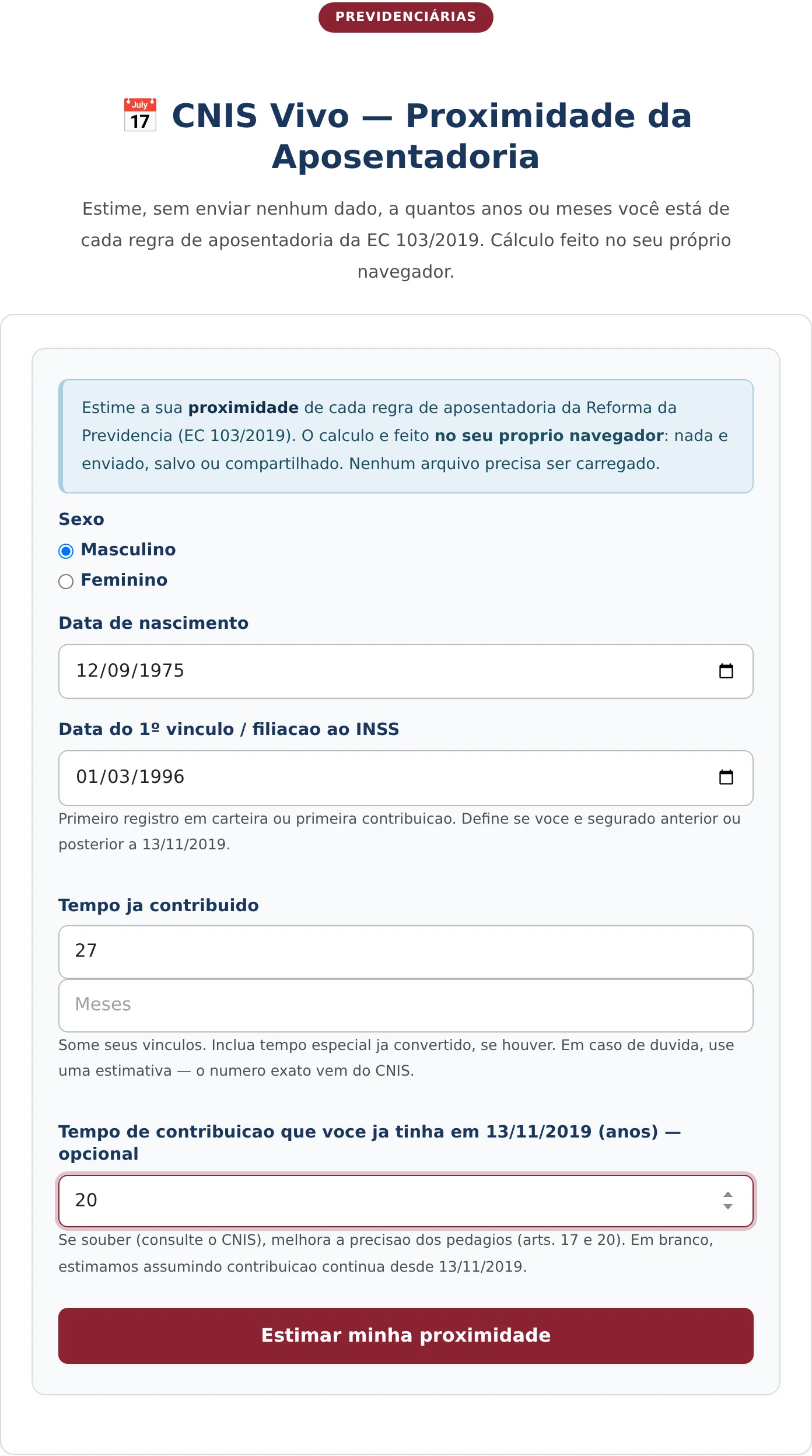
The screen has five fields. The first is sex selection, using radio buttons. The second is the date of birth. The third is the date of the first employment relationship or first contribution.
The fourth accepts the years already contributed, with guidance that estimates are acceptable and that the exact number comes from the official statement. The fifth is optional and accepts the time accrued as of the date of the reform, which improves the accuracy of the additional-time calculations.

2. Fill in the insured person’s information
In the example, the person is a man born in September 1975, with initial enrollment in March 1996, 27 accumulated years of contributions, and 20 years accrued as of the date of the reform.
The date of initial enrollment does more than classify the insured person. It makes it possible to check the consistency between the reported time and the period of contribution history, which helps identify unrealistic estimates.
3. Estimate and read the comparison
The estimate button opens a card highlighting the closest milestone and, below it, one block for each rule, with its legal basis, an explanation of how it works, current status, and the distance to meeting its requirements.

How to read each results block
In the example, the closest milestone is the progressive minimum age, with the profile summarized in the heading: male, 51 years old, approximately 27 years of contributions.
The progressive minimum-age block states the legal basis, explains how the rule works with a minimum age of 64.5 years and a minimum contribution period of 35 years, records the current age and contribution time, and concludes with the estimated distance.
The points-system block follows the same structure. It states the target of 103 points in the current year, noting that it rises by one point each year up to the limit, and records the insured person’s current score.
This comparison is instructive. In the example, the points rule appears more accessible because it does not require a minimum age, but the progression of the target means it is reached after the progressive minimum age.
The 50% additional-time block appears marked as inapplicable, with the reason stated clearly: the rule is restricted to those who, on the date of the reform, were at most two years from the minimum contribution period. Transparency about ineligibility avoids the most common doubt.
The figures are preceded by a tilde, indicating that they are approximate. This is consistent with the nature of the tool, which works with estimated time rather than an official statement.
Why local calculation matters
The decision to calculate in the browser deserves comment because it touches on a sensitive issue.
Social security data is personal information. Dates of birth, contribution history, and enrollment time, taken together, describe a person’s work history, and data protection legislation treats this information with care.
A tool that processes this data on a server must justify its collection, define its purpose, retention period, and legal basis. A tool that processes it in the browser collects nothing: the data never leaves the device.
This choice has a technical cost because it limits the complexity of the calculation to what the browser can perform, and it provides a direct benefit to those who use it.
The applicable principle is minimization: processing only the data necessary for the purpose. When the purpose can be achieved without any processing at all, that is the solution most consistent with the rule.
It is worth noting that the tool states this feature in its own description, allowing the user to know what happens to the information they enter.
A word about using the estimate responsibly, because it answers a question with long-term consequences.
The calculated distance depends entirely on the reported time, and time estimated from memory often differs from recognized time. Periods with pending issues in the statement, unrecorded employment relationships, and months without contributions reduce the effective time.
The practical recommendation is to use the tool in two stages. First, use an estimate to get an order of magnitude. Then use the number taken from the official statement, after checking it for pending issues, to obtain a projection that can be used for planning.
When the two estimates differ significantly, the difference is usually found in statement indicators that exclude periods from the calculation, a subject addressed by another tool in the collection.
What the tool does not do
CNIS Vivo (Brazil’s National Register of Social Information) does not read the social security statement or access any official database. The reported time is what the user declares, and the accuracy of the result depends on it.
It also does not calculate the benefit amount or convert special or rural service time, operations that require documentation and are addressed by specific tools.
And it does not replace the complete simulation, which considers salary averages and coefficients and is available in another tool in the collection.
Frequently Asked Questions
Is the information provided sent to any server?
No. The calculation is performed in the browser itself, and the information entered does not leave the device. This feature is stated in the tool’s description and aligns with the principle of minimizing the processing of personal data.
Why does the points target increase every year?
Because the transition rule was designed with annual progression, so the requirement increases by one point each year until it reaches the established limit. Those who accumulate points at the same pace as the progression do not move closer to the target.
Does the result replace the official simulation?
No. The tool works with estimated time provided by the user and returns approximations, identified as such. The exact number depends on the official social security statement and verification of the recorded employment relationships.
Receba novidades por e-mail
Cadastre-se gratuitamente para receber nossos novos artigos.
Seus dados estão protegidos conforme a LGPD.
Ficou com dúvidas? Fale com um advogado especialista.
📱 Falar pelo WhatsAppAs informações deste artigo são de caráter informativo e não substituem consulta jurídica individualizada. Cada caso possui particularidades que exigem análise específica.


